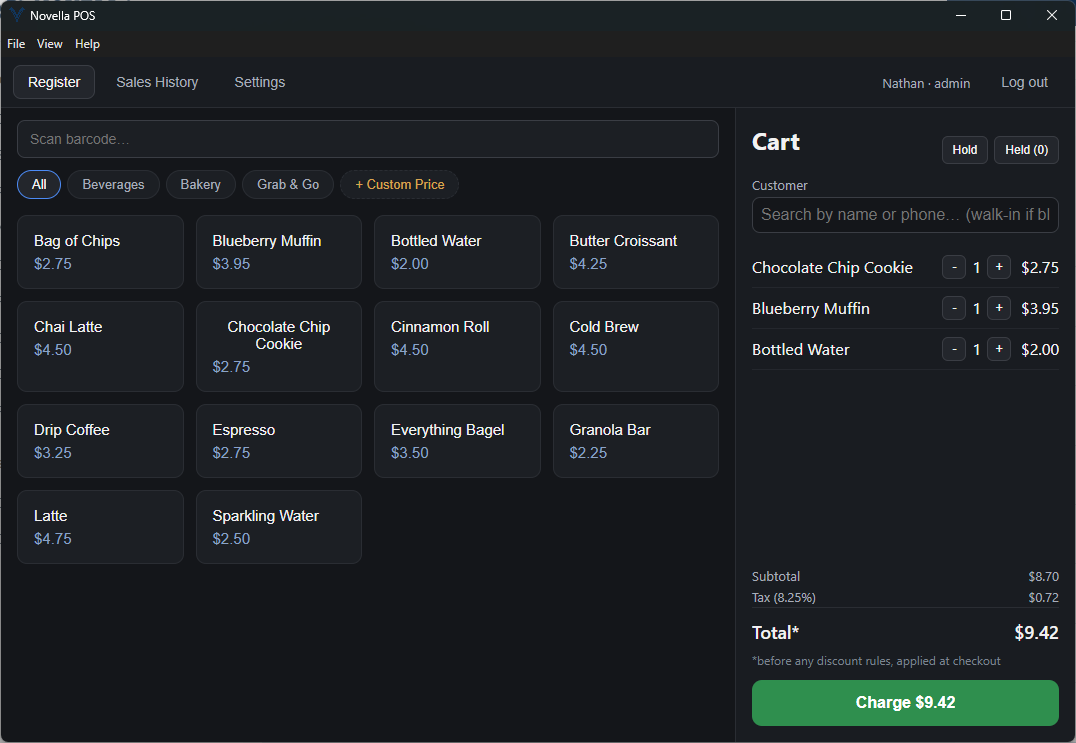
Novella POS is a Windows desktop register for small retail shops and food-service
counters. Barcode checkout, card payments through your own merchant account,
customizable receipts, employee PINs, cash-drawer reconciliation and
register-style reporting, all in one application.
The register: barcode field, category product grid and cart.
What it does
Everything a small counter runs on, in one window.
Novella POS was written from scratch for shops that need a real register rather
than a tablet app with a monthly bill attached. Here is what ships in it today.
Checkout
Ring a sale the way the counter actually works: scanned, tapped from a grid, or typed in by hand.
Barcode scanning with any USB keyboard-wedge scanner
Category-organized product grid
Manual price entry for items not in inventory
Quick Sale for simple cash-in-hand transactions
Hold a ticket and recall it later
Payments
Card processing runs through Accept.blue on your own merchant account, with card data handled outside the app.
Cash, card and store credit tenders
Card charges reverse automatically when a sale is voided
PCI-compliant hosted tokenization for card entry
Optional cash-discount or card-surcharge pricing
Receipts and printing
Prints to any printer Windows already knows about, so there is no thermal-printer driver to hunt down.
Upload your logo, set header and footer messages
Choose which store details print, and where
Add a per-sale custom note, such as a tracking number
Optional USB trigger pops the cash drawer on cash sales
Team and customers
Everyone signs in with a PIN. Regulars get a record and a store-credit balance.
PIN-based login with admin and cashier roles
PIN resets handled in-app by an admin
Customer contact details and store credit
Live customer lookup by name, phone or email
Cash drawer and history
Open and close the till properly, and keep an auditable record of every sale.
Open a drawer session with a starting float
Pay-ins and pay-outs during a shift
Automatic variance calculation at close-out
Void with reason tracking, and reprint any past receipt
Reporting
A Sales Summary that behaves like the X and Z reports you already know, plus the breakdowns behind it.
Gross sales, discounts, tax, net total and tender breakdown
Sales by Item, by Employee and by Category
Void tracking across any date range
Presets for today, yesterday, this week and this month
The decisions that matter in a point-of-sale system are rarely the ones on the
feature list. These are the ones we made deliberately.
Your merchant account, not ours
You connect your own Accept.blue account with your own credentials. Your processing relationship and your rates stay yours. Novella POS is the register, not the middleman.
Card numbers never touch the app
Card entry happens in a hosted tokenization widget provided by the gateway. Raw card data goes straight from that widget to the processor, so it never passes through Novella POS or gets stored on your machine.
Hardware you probably already own
Any USB barcode scanner that types like a keyboard works with no configuration. Receipts print to whatever printer is already installed in Windows. A USB cash-drawer trigger is supported but optional.
Activates without an internet connection
Each install is unlocked with a cryptographically signed license key that is verified on the device. There is no activation server to phone home to and no lockout if the shop loses its connection.
Get in touch
See it running on your counter.
Novella POS is in active development and being fitted to real shops now.
Tell us what you sell and how you ring it up, and we will walk you through
the application and what setup would look like for your store.